Chapter Three: MIDI

2. MIDI Hardware Specification
Much of the MIDI hardware described on this page has been overtaken by software and by newer connections. Where a studio once filled racks with synthesizers and sound modules wired together through a multiport interface, today most composers play virtual instruments inside a DAW, and MIDI passes between tracks and plug-ins without ever leaving the computer; for many, the only MIDI hardware left is a USB controller keyboard or pad. The connections themselves have changed too, with USB-MIDI, Ethernet and Wi-Fi MIDI, and even Bluetooth MIDI supplanting the original classic MIDI cable/interface/network described below.
Yet just as modular synths and vintage reel-to-reel recording have made a comeback, so has hardware MIDI. Hardware synthesizers, drum machines and Eurorack modular systems are popular again, and they need MIDI to talk to a keyboard or computer: a modular synth runs on control voltages, but a MIDI-to-CV module is the usual way to play it from a keyboard or sequence it from a DAW. So we begin with the original MIDI hardware spec and discuss recent additions lower down on the page.
Summary of the original MIDI hardware specification
The MIDI 1.0 specification began with a set of common hardware requirements. Each MIDI-capable instrument is equipped with a MIDI transmitter and receiver, though certain peripheral devices, such as signal processors, may have only a receiver or a transmitter. This standard interface uses asynchronous (serial) transmission at 31.25 kbaud (1 baud = 1 bit per second). Each byte consists of a start bit, eight data bits and a stop bit, for a total duration of 0.32 ms per byte, so a single three-byte Note On message takes about 1 ms, and a ten-note chord arrives spread across several milliseconds. While this rate was adequate for the applications originally envisioned, it has proven to be one of the major stumbling blocks for generating more complex data streams in time-dependent situations. Though some manufacturers originally included alternative parallel interfaces on their instruments for linking their own peripheral devices, the overwhelming success of MIDI saw the abandonment of almost all other interconnecting formats until recently (see below).
Seen from the front, key notch up
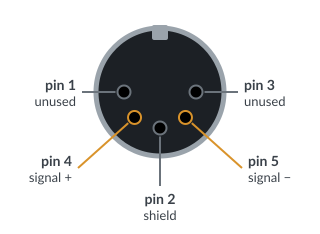
Pin assignments of a MIDI jack
MIDI cables connect instruments by means of MIDI IN, MIDI OUT and MIDI THRU jacks. The jacks use 5-pin DIN connectors, since they were inexpensive and widely available and, at least in the US, different enough from the 1/4-inch and RCA jacks used for audio that they couldn't be plugged into audio gear by mistake. Only three of the five conductors are used, with pins 1 and 3 (the outermost two of the semicircle) carrying no current. Pin 2, in the center, connects the cable's shield, and pins 4 and 5 carry the signal. Additionally, to prevent audio ground loops and hum, every MIDI IN is opto-isolated: inside the receiving device, the current from the cable lights a tiny LED, and a light-sensitive switch beside it reads the pulses, so the two devices' grounds are never electrically connected.
The MIDI IN port receives incoming MIDI messages; the MIDI OUT port transmits actions of the keyboard to other keyboards or a computer. The MIDI THRU jack provides a direct copy of data coming into the MIDI IN jack, so several instruments and devices can be "daisy chained" together. Any action on an instrument that corresponds to a particular MIDI code (such as a key depressed or a program button changed) will normally transmit that action's code to the MIDI OUT, but not to the MIDI THRU. Many more recent instruments have a switch that changes the function of a MIDI THRU port to a MIDI OUT port. Each pass through a THRU jack slightly distorts the timing of the pulses, however, so chains of more than three or four devices can start to drop or garble data, one reason for the multiport interfaces described below.
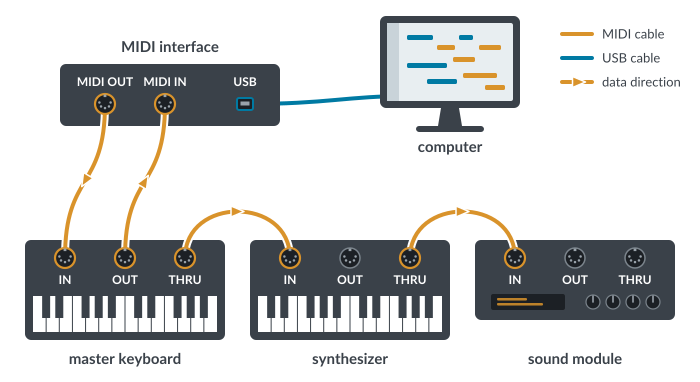
A simple MIDI daisy chain
The major potential of MIDI was realized when a network of instruments and other musical devices was connected to a computer by means of a MIDI interface. The basic job of a MIDI interface is translation: it converts MIDI's 31.25 kbaud serial signal to and from the computer's own port (once a serial or printer port, today USB). An interface's connections may be as simple as one MIDI IN and one MIDI OUT jack with information distributed through the daisy chain mentioned and pictured above.

Rear panel of a typical multiport interface: eight MIDI OUTs and eight MIDI INs, SMPTE timecode in and out, and one USB connection to the computer
Over the years, interfaces have become more elaborate and now provide more MIDI INs and OUTs for more complex and flexible networks, merging facilities to handle several input devices simultaneously, coded routing of data to specified cables, and generation and/or conversion of timing synchronization codes for use with video and multitrack audio equipment. Some interfaces are also capable of selective filtering and/or remapping of MIDI data.
Current MIDI hardware additions
Much as the MMA had standardized MIDI connectivity, in the 1990s several big computer manufacturers organized to standardize USB connectivity and formed the USB Implementers Forum (USB-IF). USB (Universal Serial Bus), with its far greater speed than MIDI (compare MIDI's 31.25 kbit/s to the 12 Mbit/s of the original USB, nearly 400 times faster, or the 5 Gbit/s of USB 3.0) and multiple device capability (up to 127 devices on a single bus), was the logical choice to replace MIDI cables and interfaces altogether, especially since many interfaces were already connecting to computers through USB. In addition, USB was hot-swappable and could be plug-and-play if a manufacturer played by the rules (called class compliant). So in 1999, the USB-IF and the MMA developed the protocols for adding MIDI to the Audio Class of devices.
Many electronic keyboards, most of them keyboard controllers designed to play virtual instruments on a computer and generating no sounds of their own, now have a single USB port for MIDI in and out (the square Type B jack found on printers or, increasingly, USB-C) and plug into a computer or USB hub just like any other USB device. The computer, or a powered USB hub, can even supply the external keyboard/device with power, if the draw is small enough. Additionally, audio interfaces connected through USB, Thunderbolt or even Ethernet can now supply BOTH audio and MIDI data through a single cable; over USB, class-compliant devices need no special driver, since MIDI is part of the USB Audio Class.
With an all-USB setup, a USB hub takes the place of the MIDI interface, and each instrument shows up on the computer as its own MIDI port. Unlike a daisy chain, though, USB instruments can't talk to one another directly: the computer passes the data between them. To play one USB instrument from another with no computer in the setup, you need a small box called a USB MIDI host, which stands in for the computer.
Though the plug-and-play aspect of USB MIDI is convenient, many older USB MIDI devices, integrated audio/MIDI interfaces and even some current devices still require manufacturer-specific drivers. It is important to keep these drivers up to date so they function well with a current computer OS.
The classic MIDI cable has also shrunk. Many compact synthesizers, drum machines and Eurorack modules now use a 3.5 mm (1/8-inch) TRS jack, the size of a headphone jack, in place of the bulky 5-pin DIN. The signal is the same 31.25 kbaud MIDI on a smaller connector. In 2018 the MMA standardized its wiring as Type A, and a short adapter cable connects it to ordinary 5-pin DIN gear. Some products made before the standard wire their jacks differently (often called Type B), so check which type a device uses before buying an adapter; a mismatched one won't pass data.
Wireless MIDI adapters, small boxes that plug into the 5-pin DIN jacks of older hardware and pass MIDI to one another by radio, have been around for a long time. The rise of Bluetooth and mobile devices led the MMA in 2015 to adopt a specification for MIDI over Bluetooth Low Energy, called BLE-MIDI. The low energy part saves battery life: the radio sleeps between short bursts of data instead of streaming constantly. This has allowed for an explosion of mobile apps to sequence and communicate MIDI data via Bluetooth.
It should be noted that USB, wireless MIDI and Bluetooth all have significant distance limits: a USB 2.0 cable can run only 5 m (16 ft) and Bluetooth reaches about 10 m (33 ft), compared with the 15 m (50 ft) the MIDI spec allows for a standard MIDI cable.
If you would like to control a MIDI device halfway around the world, and you have a Mac, lurking in the MIDI Studio window of the Audio MIDI Setup utility is the Network node icon. Double-clicking it opens MIDI Network Setup, where you can create a session that others can join (Apple's Bonjour finds computers on your local network automatically; distant ones are added by address), and it even shows an estimate of the latency of the data traveling back and forth. The protocol is called RTP-MIDI (RTP stands for Real-time Transport Protocol), or AppleMIDI, and was developed to send MIDI messages over Ethernet and Wi-Fi networks. On Windows, Tobias Erichsen's free driver, rtpMIDI, does the same job.
MIDI 2.0, adopted in 2020, brings its own versions of these connections. The USB-IF published a USB MIDI 2.0 device class that same year, and in November 2024 the MIDI Association and its Japanese counterpart, AMEI, ratified Network MIDI 2.0, which sends MIDI over Ethernet and Wi-Fi within a local network and is expected eventually to replace RTP-MIDI for many uses. Both carry MIDI 1.0 messages as well as MIDI 2.0, so older and newer gear can share a connection. Computers are catching up too: Apple's operating systems already support MIDI 2.0, and in 2026 Microsoft began rolling out Windows MIDI Services, built-in MIDI 1.0 and 2.0 support for Windows 11.
Despite all these new methods for connectivity and transmission of MIDI data, the core codes that are embedded in the data stream are still, amazingly enough, the same codes, developed in 1983, that are discussed in the following pages. MIDI 2.0 adds a richer, higher-resolution message format of its own, but MIDI 2.0 devices fall back to these MIDI 1.0 codes when talking to older gear.
As this page will inevitably become out of date again, particularly as MIDI 2.0 makes its way into instruments and computers, current information on MIDI specifications can always be had from the MIDI Association's website at https://www.midi.org.
