Chapter Two: Studio Gear
4. Mixing Consoles | Page 4

The whole strip—
signal flows downward
Input Channel Strips (continued)
5Panning

The pan pot controls the left/right balance of the channel's output, or its odd/even balance when it is routed to a pair of groups (see section 7 below). A stereo instrument coming into two board channels should be panned hard left on one channel and hard right on the other to maintain the maximum stereo effect. On the other hand, when planning the stereo image of a piece (which you should do!), consider placing mono sounds across the full range of the stereo field. Having mono sounds panned hard to one speaker or the other tends to make a listener aware of only two locations rather than a continuous image spread between the speakers and should be reserved for special circumstances. A pan pot on a stereo channel, which may be labeled balance instead, will actually attenuate one input or the other (L or R) when turned off center.
6Mute and Solo

The mute button will silence the channel when activated, while the solo button will send the channel's signal to a separate solo bus, usually controlled by a solo master pot. On most boards, soloing replaces what you hear in the control-room speakers or headphones with the soloed channels alone, while the main mix carries on unchanged. Some boards also offer solo in place (SIP), which really does mute every un-soloed channel in the main mix—handy at mixdown, dangerous during a live show. Either way, solo can be tricky on digital boards that have multiple layers of input channels, where the soloed channel may not be visible. Solo is designed to isolate sounds for actions such as EQ'ing, checking effect returns, or troubleshooting missing signals. Multiple channels may be soloed at the same time. On newer boards, there are often options as to what the solo bus does.
7The Channel Output Module
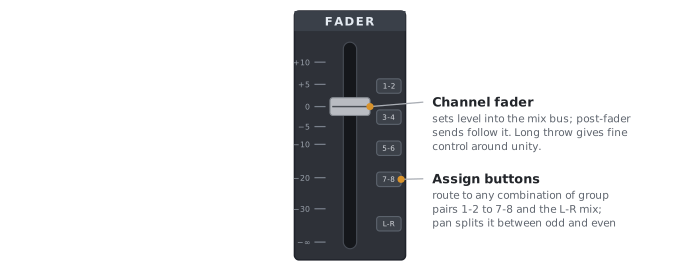
The channel output module controls the level and routing of the channel signal after it has gone through the input and EQ sections. Selector buttons route the channel to any combination of destinations. Buttons labeled 1-2, 3-4, etc. route the signal to the board's group outputs (eight on a typical 8-bus board), where they may be routed to separate speakers, or used to create a stereo mix in another board section. Each button feeds a pair of groups, and the pan pot decides how the signal divides between the odd- and even-numbered group of the pair. The master levels for group outputs are usually found as a separate bank of faders on the right side of the mixing console (see next page).
The Stereo or L-R selector routes the signal to the Left/Right or Stereo Mix output, usually controlled by a single master fader (color-coded red on many boards) to the right of the group output faders. The stereo bus is used primarily in a two-channel listening environment, or with a headphone mixdown. In a surround studio whose eight group outputs feed eight speakers, the stereo bus can also be used to feed the subwoofer.
The channel fader (the long vertical slider at the bottom of the strip) sets the level of the channel's signal going to whichever outputs are selected and the level of signal to the effects sends if they are set to post-fader. The fader scale is marked in dB, relative to unity gain. Faders are for the most part logarithmic (audio taper), so equal distances of travel give roughly equal steps in dB, which matches the way we hear; the scale is spread out at the top of its travel, around unity, and squeezed together toward the bottom. If they were linear, a steady pull would seem to do very little at first and then drop the sound away abruptly near the bottom: halfway down would be only 6 dB quieter.
The 0 mark (labeled U on some boards) is unity gain: the fader passes the signal at the level at which it arrives, neither boosting nor cutting it. Don't confuse it with the 0 on the board's meters: there, 0 VU marks a signal level of +4 dBu, which, as mentioned earlier, corresponds to pro gear line level. The fader's 0 is a setting (no change), not a level. Above 0, additional strength (positive gain) is added to the signal. It is important to watch your channel meters when adding gain, because if a signal arrives at the channel already hot or you add additional energy through EQ, more than likely, your channel output will clip and distort. Remember, approximately every 6 dB is a doubling of amplitude. Below unity, the scale is marked in negative dB, all the way down to minus infinity (−∞), or silence.
Some boards include a PFL or pre-fader listen button in this section to allow auditioning the channel signal, normally post-EQ, but at the level set by the trim, not attenuated or boosted by the channel fader. This is really helpful in live-sound reinforcement situations where one might want to monitor the incoming signal on headphones without disturbing the pre-set fader level. Boards like the Yamaha 01V96 don't have a PFL button, but allow the solo button to act as PFL when choosing pre-fader on the solo setup page.
PFL is most often routed to the monitor bus by default, and on many setups that bus feeds the control-room speakers as well as the headphones. Because PFL ignores the fader, a channel you had pulled well down can come through those speakers at full strength.
